
Artificial Intelligence has evolved from simple chatbots into more advanced systems capable of autonomous decision-making and task execution. These systems are often referred to as Agentic AI. Unlike traditional automation tools that follow fixed rules, agentic AI tools can plan, adapt, and execute multi-step tasks with minimal human input. This article explores how beginners and non-programmers can leverage these tools to build small automation projects efficiently.
What is Agentic AI?
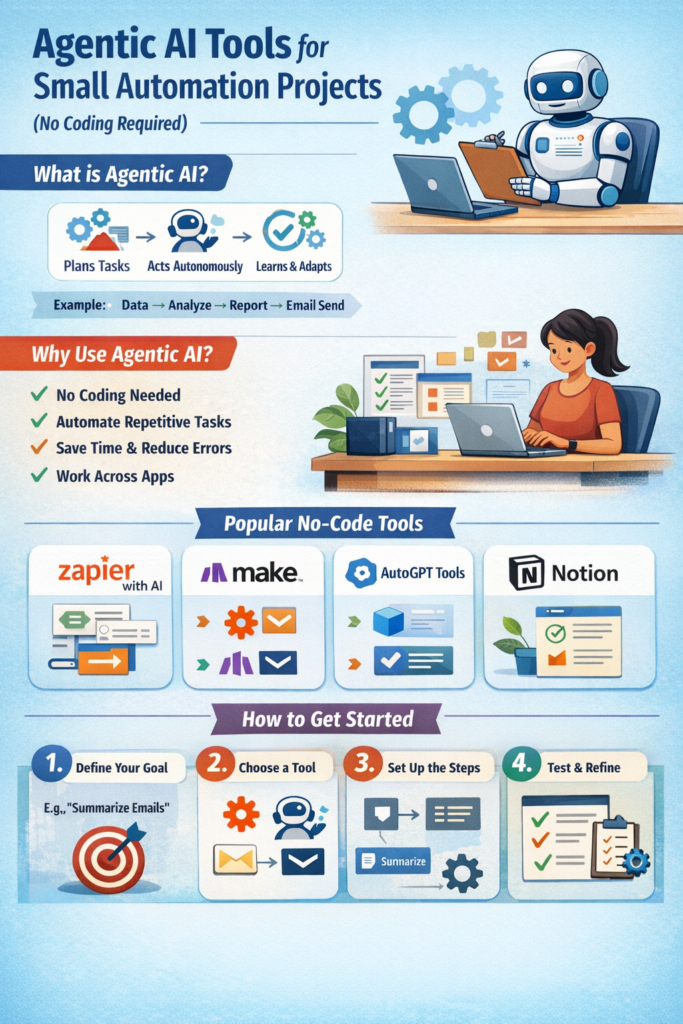
Agentic AI refers to systems that act like “agents” — they can:
- Understand goals
- Break them into tasks
- Execute actions
- Adjust based on results
For example, instead of manually sending daily reports, an agentic system can:
- Gather data
- Analyze it
- Generate a report
- Send it via email automatically
Why Use Agentic AI for Small Projects?
Agentic AI tools are especially useful for individuals who:
- Have no coding experience
- Want to automate repetitive tasks
- Need quick solutions without hiring developers
Key Benefits
- Saves time on routine work
- Reduces human error
- Works across multiple apps (email, spreadsheets, websites)
- Requires minimal setup
Popular No-Code Agentic AI Tools
1. Zapier (with AI Agents)
Zapier has evolved beyond simple automation into AI-powered workflows.
What it does:
- Connects apps like Gmail, Slack, Google Sheets
- Automates workflows (called “Zaps”)
- Uses AI to make decisions within workflows
Example Project:
Automatically summarize emails and store key points in a spreadsheet.
2. Make (formerly Integromat)
Make provides a visual interface to design complex workflows.
Key Features:
- Drag-and-drop automation builder
- Supports conditional logic
- Integrates with hundreds of apps
Example Project:
Monitor a website and notify you when content changes.
3. AutoGPT-style Tools (No-Code Interfaces)
These tools simulate autonomous AI agents that can complete multi-step tasks.
Capabilities:
- Task planning
- Web browsing
- File handling
Example Project:
Research a topic, summarize findings, and compile a report automatically.
4. Notion AI + Automations
Notion combines note-taking with AI-powered automation.
What you can do:
- Generate content automatically
- Manage tasks and workflows
- Create self-updating dashboards
Example Project:
Automatically generate meeting summaries and action items.
5. Microsoft Power Automate
A powerful automation platform integrated with Microsoft tools.
Features:
- Works with Excel, Outlook, Teams
- Includes AI Builder for smart decisions
- Offers templates for quick setup
Example Project:
Save email attachments directly to cloud storage and notify your team.
How to Build Your First Agentic Automation (Step-by-Step)
Step 1: Define Your Goal
Example: “I want to automatically save and summarize important emails.”
Step 2: Choose a Tool
Pick a no-code platform like Zapier or Make.
Step 3: Break the Task Into Steps
- Detect new email
- Filter important ones
- Summarize content
- Save results
Step 4: Add AI Logic
Use built-in AI features to:
- Classify emails
- Generate summaries
Step 5: Test and Refine
Run your automation and adjust conditions as needed.
Common Use Cases
Personal Productivity
- Daily to-do list generation
- Email summarization
- Calendar scheduling
Small Business Automation
- Customer inquiry responses
- Invoice processing
- Social media posting
Data Handling
- Web scraping (basic)
- Report generation
- Data entry automation
Limitations to Consider
While powerful, these tools are not perfect:
- May require some trial and error
- Complex workflows can become hard to manage
- Some features are paid
- AI decisions may need human review
Conclusion
Agentic AI tools are making automation accessible to everyone — even those without technical backgrounds. By combining AI reasoning with no-code platforms, users can build powerful workflows that save time and improve efficiency.
For small automation projects, these tools provide a practical starting point:
- Easy to learn
- Quick to implement
- Scalable over time
As these technologies continue to evolve, the line between “user” and “developer” is becoming increasingly blurred — empowering more people to create intelligent systems without writing a single line of code.