
Agentic AI is transforming how modern systems operate by enabling autonomous decision-making and task execution. These systems are built to think, act, and iterate toward a goal without constant human input. However, with this power comes complexity. Debugging agentic AI workflows in Python can be challenging because errors are often hidden across multiple steps, decisions, and integrations. If your AI workflow is not behaving as expected, this guide will walk you through a structured, step-by-step process to identify and fix errors effectively.
What is an Agentic AI Workflow?
An agentic AI workflow is a system where an intelligent agent processes input, makes decisions, performs actions, and continuously updates its behavior based on outcomes. These workflows are typically built using Python and connected with APIs, machine learning models, and automation tools. Unlike traditional programs, agentic systems are dynamic. This makes debugging more complex because errors may not be immediately apparent or may only appear under specific conditions.
Common Errors in Agentic AI Workflows
Before diving into debugging, it is important to understand the types of errors you are likely to encounter. Most issues fall into a few key categories.
Input-related errors occur when the data passed into the system is incomplete, incorrectly formatted, or inconsistent. Logic errors happen when the workflow takes incorrect decisions, often resulting in loops or wrong outputs. API failures are also common, especially when external services fail or return unexpected responses. Another major issue is hallucination, where the AI generates incorrect or misleading outputs. Finally, state management problems occur when the system loses context or fails to track previous steps.
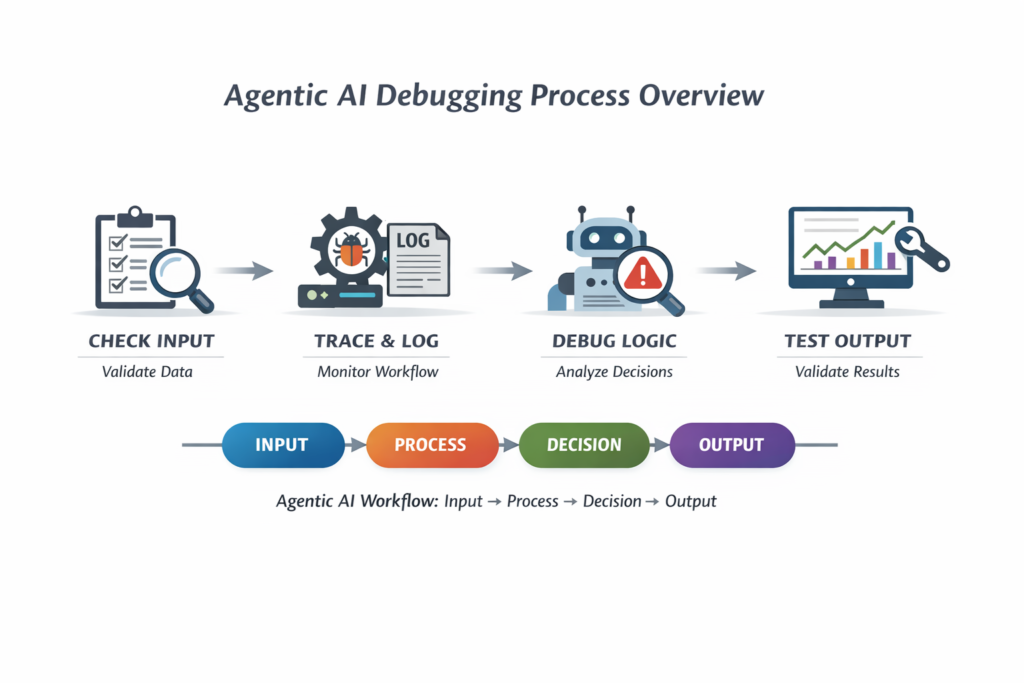
Visual Overview of Agentic AI Debugging Process
The diagram above represents a typical agentic workflow. Debugging involves checking each stage systematically instead of treating the system as a black box.
Step 1: Understand the Workflow Structure
The first step in debugging is to clearly understand how your workflow operates. Every agentic system follows a basic structure: input is received, processed, decisions are made, and outputs are generated. If you do not map this structure, debugging becomes guesswork. Break your workflow into smaller logical steps and identify where each operation occurs. This clarity will help you isolate the exact point of failure.
Step 2: Validate Input Data
A large percentage of errors originates from invalid or poorly structured input data. Before analyzing complex logic, always verify that your inputs are correct. Check whether the data type matches expectations, whether required fields are present, and whether the structure is consistent. Even a small mismatch can cause the entire workflow to fail or behave unpredictably. Validating inputs early ensures that downstream processes receive clean and reliable data.
Step 3: Add Logging to Track Execution
Logging is one of the most powerful debugging techniques. It allows you to track what your AI agent is doing at each step. By adding logging statements throughout your workflow, you can monitor execution flow, identify where the process stops, and understand what data is being processed at each stage. This visibility is essential for diagnosing complex issues. Instead of guessing what went wrong, logs provide concrete evidence of system behavior.
Step 4: Trace Execution Step by Step
Running the entire workflow at once makes it difficult to identify errors. Instead, execute each step individually and observe the output. By breaking the process into smaller parts, you can isolate the exact step where the issue occurs. This approach reduces complexity and allows you to focus on one problem at a time. Step-by-step tracing is especially useful in multi-agent systems where interactions between components can introduce unexpected behavior.
Step 5: Handle Exceptions Properly
Many systems fail silently because errors are not handled correctly. Proper exception handling ensures that errors are captured and reported instead of being ignored. Whenever your workflow interacts with external systems or performs critical operations, wrap those sections with error-handling mechanisms. This prevents crashes and provides useful error messages for debugging. Clear error reporting is essential for understanding what went wrong and how to fix it.
Step 6: Debug AI Decision-Making
Agentic AI systems rely heavily on decision-making logic. If the agent is making incorrect decisions, the entire workflow will produce wrong results. To debug this, analyze the intermediate outputs generated during decision-making. Check whether the logic aligns with your expectations and whether the AI has enough context to make accurate decisions. Often, improving prompts, refining logic, or adding constraints can significantly improve results.
Step 7: Monitor API Calls and Integrations
Most agentic workflows depend on external APIs for data, models, or services. Failures in these integrations can disrupt the entire system. Monitor response times, check for error codes, and verify that the returned data matches expectations. Even minor inconsistencies in API responses can lead to major issues in downstream processing. Ensuring reliable communication between components is critical for system stability.
Step 8: Reduce Hallucinations in AI Outputs
Hallucination is a common problem in AI systems where the model generates incorrect or fabricated information. This can lead to unreliable outputs and poor user experience. To reduce hallucinations, improve the clarity of prompts, enforce constraints, and validate outputs before using them. Adding verification steps ensures that the system produces accurate and trustworthy results.
Step 9: Use Debugging Tools in Python
Python provides several built-in tools that make debugging easier. Interactive debuggers allow you to pause execution and inspect variables in real time. Logging libraries provide detailed execution traces, while visualization tools help map workflows and identify bottlenecks. Using these tools effectively can significantly reduce debugging time and improve system reliability.
Step 10: Test with Small and Controlled Data
Debugging large datasets can make it difficult to identify issues. Instead, use small and controlled inputs to test your workflow. This approach allows you to reproduce errors consistently and understand how the system behaves under specific conditions. Once the issue is resolved, you can scale up testing with larger datasets.
Best Practices to Avoid Agentic AI Workflow Errors
Preventing errors is more efficient than fixing them later. Writing modular code helps isolate functionality and makes debugging easier. Version control allows you to track changes and identify when issues were introduced. Validation layers ensure data integrity at every stage. Continuous testing is also essential. By regularly testing individual components and the overall system, you can catch issues early and maintain stability. Monitoring performance metrics such as latency, accuracy, and error rates provides valuable insights into system health and helps detect problems before they escalate.
Real-World Debugging Scenario
Consider a situation where your AI agent is producing incorrect outputs. Instead of attempting random fixes, follow a structured approach. Start by verifying the input data to ensure it is correct. Then add logging to track execution and identify where the workflow deviates from expectations. Trace each step individually to locate the error. Once identified, analyze the logic and make necessary adjustments. This systematic approach ensures efficient debugging and prevents repeated mistakes.
Advanced Debugging Techniques
As your systems become more complex, basic debugging methods may not be sufficient. Advanced techniques, such as reasoning trace analysis, can help you understand how the AI arrives at decisions. Replay testing allows you to run the same workflow multiple times with identical inputs to identify inconsistencies. Output validation mechanisms ensure that results meet predefined criteria before being accepted. These techniques improve reliability and make your systems more robust.
Why Debugging Agentic AI Matters
Debugging is not just a technical necessity; it is essential for building reliable AI systems. Poorly functioning workflows can lead to incorrect decisions, reduced trust, and operational inefficiencies. As businesses increasingly rely on AI-driven automation, the ability to debug and maintain these systems becomes a critical skill. High-quality, error-free workflows ensure better performance and user satisfaction.
Frequently Asked Questions
Many developers wonder why agentic AI workflows fail. The most common reasons include poor input data, flawed logic, and unreliable integrations. Understanding these factors is the first step toward building stable systems.
Another common question is how to debug AI workflows effectively. The answer lies in following a structured approach that includes validation, logging, tracing, and testing.
Reducing errors requires continuous improvement. By refining inputs, enhancing logic, and monitoring performance, you can significantly improve system reliability.
Conclusion
Debugging agentic AI workflow errors in Python requires a structured and disciplined approach. By understanding the workflow, validating inputs, adding logging, tracing execution, and monitoring performance, you can identify and fix issues efficiently. The goal is not just to fix errors but to build systems that are reliable, scalable, and capable of handling real-world challenges. With the right techniques and tools, debugging becomes a manageable and even insightful process.
Final Insight
The most effective developers are not those who avoid errors, but those who know how to identify, understand, and resolve them quickly. Mastering debugging is essential for anyone working with agentic AI systems.