
Learn how to automate repetitive tasks with AI tools in 2026 — no coding required. Save 20+ hours a week using free and affordable AI automation tools. Step-by-step beginner guide. How to automate tasks with AI: AI task automation for beginners, automate work with AI no code, AI automation tools 2026, automate business tasks with artificial intelligence, save time with AI automation
Introduction
Imagine waking up every morning to find that while you were sleeping, your business already sent follow-up emails to new leads, posted fresh content on your social media, answered your customers’ most common questions, and updated your spreadsheets — all without you lifting a finger. This is not a dream. In 2026, this is called AI automation — and it is available to anyone, completely free or at very low cost, with zero coding skills required. Whether you are a student, a freelancer, a small business owner, or someone who simply wants to get more done in less time, AI automation is the single most powerful productivity tool available to you right now. In this complete beginner’s guide, we will walk you through exactly what AI automation is, which tasks you can automate today, the best tools to use, and a practical step-by-step plan to start saving hours every single week.

What Is AI Task Automation? (Simple Explanation)
Before we jump into tools and techniques, let us make sure we understand exactly what “automating tasks with AI” actually means — in plain language.
Traditional automation is when you set up a system to perform a fixed, repetitive action automatically. For example: every time someone fills out a form on your website, they automatically receive an email. This does not require intelligence — it is just a trigger and an action.
AI automation goes further. It adds intelligence to the process. Instead of just following fixed rules, AI can read and understand information, make decisions, generate responses, summarize documents, classify content, and adapt to different situations — all automatically, without human involvement.
Here is a simple comparison:
| Without AI automation | With AI automation |
| You write every customer reply manually | AI reads the customer’s message and writes a personalised reply |
| You post on social media when you remember | AI generates and schedules your posts automatically |
| You sort emails by hand | AI categorises, summarises, and prioritises your inbox |
| You write weekly reports manually | AI compiles data and generates a formatted report |
| You answer the same FAQs repeatedly | AI chatbot handles all common questions 24/7 |
The result of AI automation is simple: you spend less time on repetitive, low-value tasks and more time on work that actually requires your human judgment, creativity, and relationships.
Why AI Automation Matters More Than Ever in 2026
The pace of AI development has accelerated dramatically. According to recent data from the U.S. Small Business Administration, small businesses that have adopted AI automation report 2.5 times more revenue growth compared to those that have not. Meanwhile, 76% of small business owners say they waste significant time every week on tasks that could easily be automated. The cost of not automating is no longer just inconvenience — it is a competitive disadvantage. While you are manually writing social media posts, your competitor is using AI to produce ten times more content. While you are responding to emails one by one, their AI chatbot is handling hundreds of customer queries simultaneously. The tools are here. They are free or affordable. They require no coding. The only question is whether you will start using them today.
Which Tasks Can You Automate with AI?
This is the most important question for beginners to answer before choosing any tools. The best approach is to think about the tasks in your daily work or business that are:
- Repetitive — you do them over and over in the same way
- Time-consuming — they eat into hours that could be better spent
- Rule-based — they follow a predictable pattern or logic
- Data-heavy — they involve reading, sorting, or processing information
Here are the main categories of tasks that AI can automate brilliantly in 2026:
1. Email and Communication
- Writing and sending follow-up emails to leads or clients
- Sorting your inbox by priority, topic, or sender
- Summarising long email threads into bullet points
- Auto-responding to common enquiries
2. Content Creation and Marketing
- Writing social media captions and scheduling posts
- Generating blog post drafts from a topic or keyword
- Creating email newsletter content weekly
- Producing product descriptions for e-commerce stores
3. Customer Service
- Answering frequently asked questions via chatbot
- Routing customer complaints to the right department
- Sending order confirmations and shipping updates
- Collecting customer feedback automatically
4. Data Entry and Management
- Moving information from one system to another (e.g., form submission to spreadsheet)
- Updating CRM records when a new customer signs up
- Generating weekly performance reports from raw data
- Organising files and documents by category
5. Social Media Management
- Auto-publishing scheduled posts across platforms
- Replying to comments and direct messages
- Summarising top-performing content weekly
- Finding trending topics in your industry
6. Finance and Administration
- Sending invoice reminders to overdue clients
- Categorising expenses from bank statements
- Generating financial summaries from spreadsheet data
- Creating and sending quotes or proposals
The Best Free AI Automation Tools for Beginners in 2026
Now that you know which tasks to target, here are the best tools to automate them — all beginner-friendly and available for free or very low cost.
Tool 1: Zapier — The Automation Engine
Best for: Connecting apps and automating workflows between them Free plan: Yes — up to 100 automated tasks per month Skill level: Beginner
Zapier is the most widely used no-code automation tool in the world. It connects over 9,000 apps — from Gmail to WhatsApp to Shopify to Google Sheets — and lets you create automated workflows called “Zaps” using a simple drag-and-drop builder.
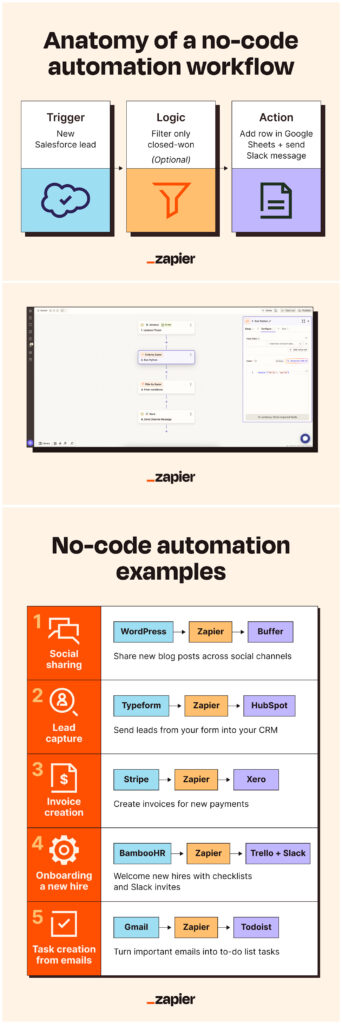
The concept is straightforward: “When this happens in App A, automatically do this in App B.”
Example Zaps you can set up in under 10 minutes: – When a new customer fills your Google Form → Add them to your email list in Mailchimp → Send a welcome email automatically – When someone messages your Instagram → Instantly reply with your product catalogue – When you publish a new blog post → Automatically share it on Facebook, Twitter, and LinkedIn – When a new order is placed on Shopify → Add the customer to your CRM and send them a thank-you email
Zapier’s free plan is genuinely useful for beginners and handles most common automation needs. As your workflow grows, paid plans start from around $20 per month.
Tool 2: Make (formerly Integromat) — Visual Workflow Builder
Best for: More complex, multi-step workflows with a visual interface Free plan: Yes — 1,000 operations per month Skill level: Beginner to intermediate
Make is Zapier’s strongest competitor, and many users prefer it because of its visual, flowchart-style interface. You can see your entire automation mapped out like a diagram — each app is a circle, and arrows show how data flows between them. Make supports over 1,500 apps and is particularly good for automations that involve multiple steps, conditions, and data transformations. For example, you could build a workflow that: 1. Monitors your Gmail for new customer enquiries 2. Uses AI to summarise and classify each message 3. Adds urgent enquiries to a priority list in Notion 4. Sends a personalised auto-reply based on the type of enquiry. This kind of intelligent, multi-step automation would have required a developer just two or three years ago. In 2026, Make lets anyone build it in an afternoon.
Tool 3: ChatGPT — Your AI Writing and Thinking Assistant
Best for: Writing, summarising, responding, analysing, and creating content automatically Free plan: Yes Skill level: Beginner
ChatGPT is not just a chatbot — when connected to tools like Zapier or used directly, it becomes a powerful automation engine for any task that involves reading or writing language.
Here is how people are using ChatGPT as part of their automation workflows:
- Email automation: Connect ChatGPT via Zapier so that when a new email arrives, ChatGPT reads it, summarises it, and drafts a reply for your review
- Content automation: Set up a weekly Zap that sends ChatGPT a list of your top-performing topics and asks it to generate five new blog post ideas
- Report automation: Every Monday morning, have ChatGPT pull your weekly sales data and write a formatted performance summary
- Customer service automation: Use ChatGPT to power your chatbot so it can handle complex, nuanced questions — not just fixed FAQ answers
The key to using ChatGPT effectively in automation is writing good prompts. A prompt is simply the instruction you give ChatGPT. The more specific and clear your instruction, the better the output.
Tool 4: Notion AI — Automate Your Knowledge Work
Best for: Organising notes, meetings, projects, and documents with AI built in Free plan: Yes (limited AI features) Skill level: Beginner
If you use Notion for notes, project management, or team collaboration, the built-in AI features can automate a large amount of knowledge work. Notion AI can:
- Turn rough meeting notes into a clean, structured action plan automatically
- Summarise long documents into a 5-bullet overview
- Draft project briefs, proposals, and reports from bullet-point inputs
- Translate your notes into different languages instantly
- Generate task lists from a project description
For freelancers, students, and small teams, Notion AI can replace hours of manual writing and organisation every week.
Tool 5: n8n — Advanced Automation for Power Users
Best for: Building sophisticated AI-powered workflows with more flexibility Free plan: Yes (self-hosted) Skill level: Intermediate
n8n is a more advanced workflow automation tool that gives you greater control and customisation than Zapier. It is particularly popular for connecting AI tools like ChatGPT and Claude into larger automation systems. A typical n8n workflow might look like this:
1. A customer sends a support email.
2. n8n passes it to ChatGPT with a prompt: “Classify this as billing, technical, or general enquiry.”
3. Based on the classification, n8n routes the email to the right team member
4. ChatGPT drafts a personalised reply
5. The reply is sent, and the interaction is logged in your CRM. n8n is free when self-hosted and is highly regarded by tech-savvy business owners who want enterprise-level automation without enterprise-level costs.
Tool 6: ManyChat — Automate Social Media Conversations
Best for: Automating Instagram DMs, Facebook Messenger, and WhatsApp conversations Free plan: Yes Skill level: Beginner
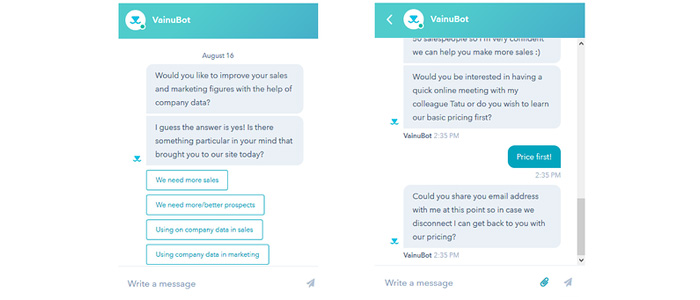
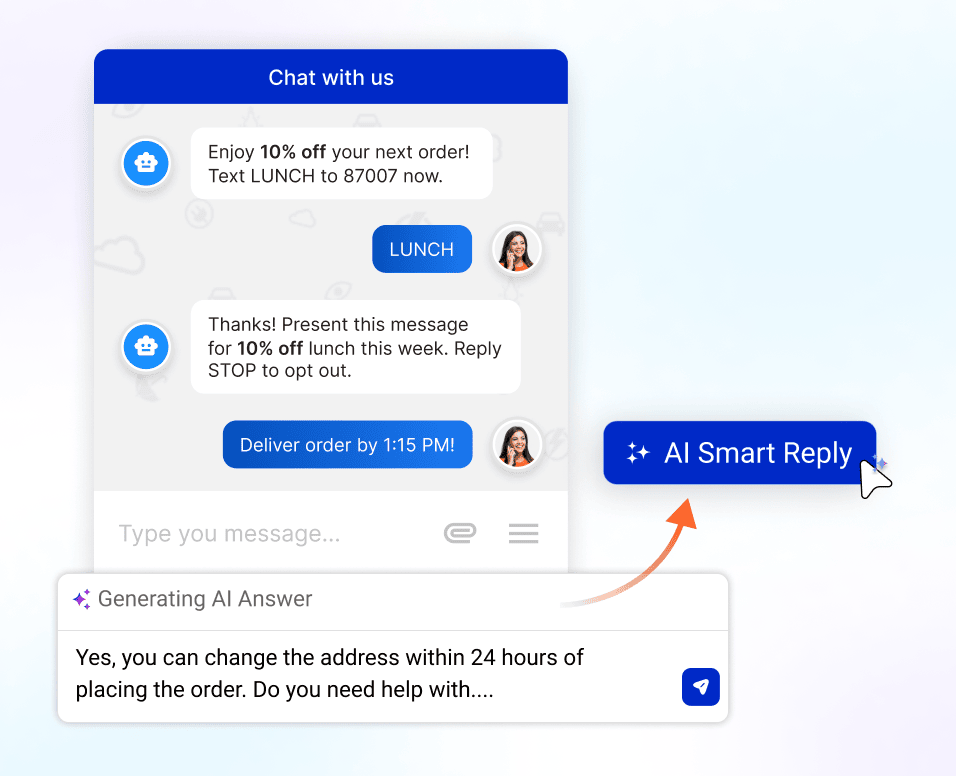
If your business relies on social media — and most do — ManyChat is one of the most powerful free tools available. It lets you automate conversations across Instagram, Facebook Messenger, and WhatsApp without any technical knowledge.
Here are practical ways businesses are using ManyChat:
- Someone comments “PRICE” on your Instagram post → ManyChat automatically sends them your full price list via DM.
- A new follower messages you → ManyChat sends them a welcome message with your top offers.
- A customer asks a common question → ManyChat answers it instantly, 24/7.
- Someone completes a purchase → ManyChat sends an automated thank-you and asks for a review.
ManyChat’s free plan handles up to 1,000 contacts and is powerful enough for most small businesses and solo entrepreneurs.

Step-by-Step: How to Start Automating Tasks with AI Today
Now that you know the tools, here is a practical, beginner-friendly plan to get started — even if you have never touched an automation tool before.
Step 1 — Identify Your Time Wasters (Day 1)
Spend 20 minutes writing down every task you do repeatedly. Be specific. Not just “emails” — but “I reply to the same five customer questions every day.” Not just “social media” — but “I manually post on Instagram every morning and it takes 30 minutes.”
This list is your automation roadmap. Circle the three tasks that waste the most time.
Step 2 — Start with One Automation (Week 1)
Pick your single biggest time waster from Step 1. Go to Zapier, create a free account, and search their template library for a pre-built automation that matches your needs. You do not have to build from scratch — Zapier has thousands of ready-made templates. For example, if you waste time adding new email subscribers to a spreadsheet, search for “Gmail to Google Sheets” and find a template that does it automatically. Set it up, test it, and let it run for a week.
Step 3 — Add One Automation Per Week (Weeks 2–6)
Once your first automation is running smoothly, add one more each week. By the end of six weeks, you will have five or six automations running simultaneously — each saving you anywhere from 30 minutes to a few hours weekly.
Step 4 — Integrate AI into Your Automations (Month 2)
Once you are comfortable with basic automation, start connecting AI. Connect ChatGPT to Zapier and experiment with having AI write, summarise, or classify information as part of your workflows. This is where the real power of AI automation unlocks.
Step 5 — Measure and Optimise (Ongoing)
Every month, look at your Zapier or Make dashboard and check how many tasks your automations have completed. Calculate the time saved. Identify any automations that are not working well and tweak them. Add new automations as your needs grow.
Common Mistakes Beginners Make with AI Automation
Learning from mistakes — especially other people’s mistakes — will save you a lot of time and frustration.
Mistake 1: Trying to automate everything at once. The most common beginner mistake is setting up 10 automations in one weekend and then feeling overwhelmed when they break or produce unexpected results. Start with one. Master it. Then add another.
Mistake 2: Not checking automated outputs regularly. AI-generated content and automated replies need to be reviewed regularly, especially at the start. Set aside 10 minutes each morning to check that your automations are producing accurate results. Adjust your prompts and settings based on what you find.
Mistake 3: Automating tasks that require human judgment. Not every task should be automated. Sensitive customer complaints, complex negotiations, creative strategy decisions, and personal relationship-building all require human involvement. Use AI to handle volume; use humans to handle nuance.
Mistake 4: Skipping the testing phase. Before you turn any automation on permanently, test it with a few sample cases. Send a test email, fill in a test form, or trigger the automation manually and check every step of the output. Fixing a mistake before it goes live is much easier than fixing it after it has sent 200 wrong emails to your customers.
Mistake 5: Ignoring data privacy. Be careful about which data you pass through AI tools. Do not send confidential financial data, customer passwords, or sensitive personal information through public AI systems. Read the privacy policy of any tool you use.
Real-World Examples of AI Automation in Action
Understanding how other people are using AI automation makes it much easier to see how you can apply it in your own situation.
A freelance writer uses ChatGPT connected to Notion to automatically generate a first draft for every new article brief she receives. She estimates this saves her two hours per article — roughly 10 hours a week.
A small e-commerce store uses Zapier to automatically send a personalised follow-up email to every customer who abandons their cart. The email is generated by ChatGPT, includes the exact products they left behind, and is sent 30 minutes after abandonment. This single automation increased their recovered sales by 18%.
A marketing consultant uses Make to monitor Google Alerts for mentions of his clients’ brands, summarise each mention using AI, and send a daily digest to each client automatically — saving him two hours of manual monitoring every day.
A teacher uses Notion AI to automatically convert her rough lesson notes into structured lesson plans every week, saving approximately three hours of planning time that she reinvests in working directly with students.
A restaurant owner uses ManyChat to automatically reply to Instagram DMs with the menu, opening hours, and reservation link — handling over 50 customer enquiries per day without any manual effort.
Frequently Asked Questions
Do I need to know how to code to automate tasks with AI? No. All the tools mentioned in this guide — Zapier, Make, ManyChat, Notion AI, and ChatGPT — are designed for non-technical users. They use visual interfaces, drag-and-drop builders, and plain-language prompts. No coding knowledge is required at any point.
Is AI automation safe for my business data? Reputable platforms like Zapier, Make, and Notion use enterprise-grade encryption and comply with GDPR and other data privacy regulations. However, always review the privacy policy of any tool before connecting it to sensitive business systems.
How much does AI automation cost? You can start completely free. Zapier’s free plan allows 100 automated tasks per month. Make’s free plan allows 1,000 operations. ChatGPT’s free version handles most basic automation needs. As your automation grows, paid plans typically cost $10–$30 per month per tool.
How long does it take to set up my first automation? Most beginners can set up their first Zapier automation in 15–30 minutes using a pre-built template. More complex multi-step workflows may take an hour or two to configure and test properly.
Can AI automation replace employees? AI automation is best thought of as a tool that handles volume and repetition, not as a replacement for human judgment and creativity. It allows one person to do the work of several people for routine tasks — freeing human employees to focus on higher-value, strategic work.
What if my automation makes a mistake? All automations make mistakes occasionally, especially in the early stages. This is why testing and regular monitoring are important. Most automation tools have a history log that shows every action taken, making it easy to identify and fix errors.
Your AI Automation Toolkit: Quick Summary
| Tool | Best for | Free plan |
| Zapier | Connecting 9,000+ apps, simple to complex workflows | ✅ Yes |
| Make | Visual multi-step workflows | ✅ Yes |
| ChatGPT | Writing, summarising, classifying, generating content | ✅ Yes |
| Notion AI | Notes, documents, meeting summaries, project management | ✅ Limited |
| ManyChat | Instagram, Facebook, WhatsApp automation | ✅ Yes |
| n8n | Advanced AI-powered workflows | ✅ Self-hosted |
Final Thoughts
AI automation is not the future — it is the present. Currently, in 2026, millions of people worldwide are saving hundreds of hours every month by letting AI handle the routine, repetitive tasks that once consumed their days. The tools are free. The setup takes minutes. The results are immediate. The only real barrier is starting. And now you have everything you need to start today. Pick one task. Choose one tool. Set up one automation. Let it run for a week and see what happens. You will very quickly understand why AI automation is being called the most important productivity revolution of our generation.